
Look Up a Token
You don’t need to track a token to look it up. These are the ways to check any token, in your DM with @prysm or in a group.
Paste the contract
Section titled “Paste the contract”The quickest way: paste the contract address on its own, in your DM or in a group. Prysm replies with a scan card with the price, market cap, liquidity, safety checks, socials and chart links, plus Refresh and Delete buttons.
The message must be just the address. If no market lists the token yet but it is a real token, Prysm replies with its name, ticker, chain and total supply, and says it isn’t tradable yet. Paste it again once it trades to get the full card.
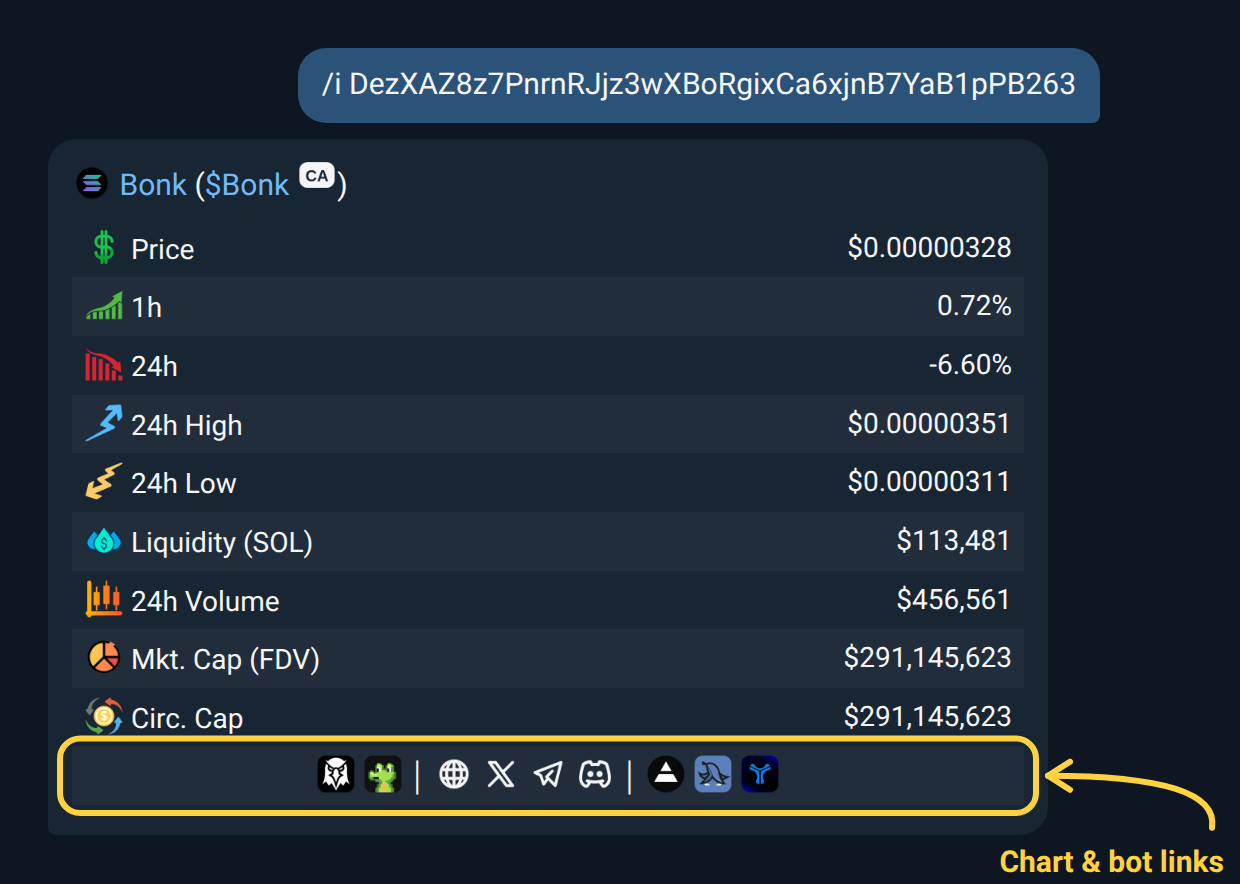
/i: the detailed card
Section titled “/i: the detailed card”/i gives a one-off card for a single token. Nothing is tracked or saved.
/i 0xa0b86991c6218b36c1d19d4a2e9eb0ce3606eb48/i delta/i moltbook base/i base moltbook- Use a contract address, a name or a ticker.
- Prysm finds the token’s main market by itself. For a name or ticker it picks the best-traded match.
- If the same name exists on several chains, add a chain shortcut before or after the name. Only that chain is searched.
The card shows:
-
The token’s name, which opens its chart in your chart provider, and its
$TICKER, which opens the block explorer. -
The contract, tap to copy.
-
Price, 1h and 24h change, and the 24h high and low when available.
-
Liquidity, 24h volume, fully diluted market cap and circulating market cap.
-
A centred row of links at the bottom, each shown as its logo, tap to open:
- your chart sites (DexScreener, GMGN and the BasedBot terminal unless you pick others);
- the token on its block explorer, then its website, X, Telegram and Discord (a grey icon means the token doesn’t list that one);
- your trading bots that trade the token’s chain.
Choose them in
/settings→ Scan → Chart Links and Trading Bots. In a group, the group’s choice applies.
/index: the market at a glance
Section titled “/index: the market at a glance”/index shows the 10 biggest coins by market cap with their price and
24-hour move, the total crypto market cap, the Fear & Greed index and
Bitcoin’s share of the market: one line per coin with its columns lined up
and a chart-up or chart-down icon for the move.
/i on its own shows how to use /i.
/chains: where the trading is
Section titled “/chains: where the trading is”/chains shows the 10 chains with the most DEX trading in the last 24 hours:
a bar chart with each chain’s volume, and under it the same list with each
chain’s logo, its volume and how it moved against the day before (a chart-up
or chart-down icon). The total across every chain is in the title. The
numbers refresh every 5 minutes.
/sentiment: fear or greed
Section titled “/sentiment: fear or greed”/sentiment (or /fng) shows the crypto Fear & Greed index on a gauge from
0 (extreme fear) to 100 (extreme greed), with yesterday’s, last week’s and
last month’s readings under it. It’s the same number /index shows.
/liquidations: what futures traders just lost
Section titled “/liquidations: what futures traders just lost”/liquidations (or /liqs) shows how much crypto futures traders had
force-closed in the last 24 hours, as a picture: the total with the share that
was longs (red) and the share that was shorts (green), the same for the last
hour and the last 4 hours, and the biggest exchanges and coins. Longs are
liquidated when the price falls, shorts when it jumps. The numbers refresh
every few minutes and cover the exchanges the bot has a liquidation feed for.
/social: a token’s socials
Section titled “/social: a token’s socials”/social collects a token’s social links in one message. It’s a group
feature: send it in a group (a private group with just you and Prysm works
too). In a DM, /social shows an Add to a group button.
Or reply /social to any message with a contract in it: a pasted contract, a
call, a forwarded alert or a Prysm scan card.
/social <contract>/social <chain> <contract>/social <chain> $ticker- Contract only works for most tokens. If the same contract exists on several EVM chains, Prysm asks you to add the chain.
- Chain + contract also works for tokens so new that no DEX lists them yet.
- Chain + ticker picks the most-traded token with that ticker on that chain. A ticker always needs a chain, since many tokens share one.
- Reply to a message that contains a contract with just
/social.
The reply is in sections:
- ✓ Verified: links confirmed by the token’s own listings, with follower or member counts where known.
- ⚠ Potential (unverified): possible matches found by searching. Prysm only goes looking for these when it finds nothing verified, so treat them with care.
- 🗨 Mentions: up to five posts on X about the token, strongest accounts first, with each account’s follower count.
If the token was launched through a launchpad that announces launches on X, the launch post is shown at the top.
/check: its website and X together
Section titled “/check: its website and X together”Reply /check to a Prysm scan card and Prysm checks the token’s website and X
account together in one message. At the top is the token with its shortened contract
(tap to copy), then a Website table (when the domain was registered, when
it last changed, and whether the contract on the page is this token’s) and an
X table (followers and key followers, the key followers themselves, when the
account joined, the country X says it’s based in, and whether its recent posts name this token’s contract), with the
last post and its pace underneath.
Match (✔) means the same contract appears, Different (✖) means another contract appears, and None means no contract was found, which proves nothing by itself because many sites show the contract only in a script or a picture. If a token has only a website or only an X account, you get that one’s usual report. If it has neither, Prysm says there’s nothing to check. It works only as a reply to a scan card, with one check every 20 seconds per person.
/pc and /ch: a token’s chart
Section titled “/pc and /ch: a token’s chart”/pc <contract> or /pc $TICKER sends the token’s scan card with its
chart on top, whatever picture your group’s scan cards normally use. It
isn’t a call, so it never names you as the first caller.
/ch <contract> or /ch $TICKER (or /chart) sends just the token’s
candlestick chart, with its market cap on the right.
Or reply with /ch (or /pc) to any message that has a contract in it: a
pasted contract, a call, a forwarded alert or a Prysm scan card. /ch 5m as
a reply picks the timeframe too.
The chart shows the token’s whole life, from launch to now, in candles sized to fit (a second for a token minutes old, up to a day for an old one), including any time on a launchpad such as pump.fun or four.meme. That stretch is shaded, and a line marks when the token moved to a DEX. Minutes with no trades are skipped, so a quiet token’s candles sit side by side instead of leaving gaps. On top of the candles:
- Launch at the first candle, when the chart starts at the token’s launch.
- The highest point shown: ATH when it is the token’s all-time high, High when the token went higher outside what’s shown.
- A dotted line and a tag at the market cap now.
- In a group, the first person who called the token here, with their profile photo, the market cap they called at and the move since.
- A header with the token’s name, chain, candle size and the period shown, then the market cap now, the all-time high (or the highest point we have, with its period) and how far it is below it. When the token hasn’t traded for a while, the header says when its last trade was.
The axis is linear, like other charts. A lone bad trade (a price that jumps far away and straight back) doesn’t set the chart’s high. Names in Korean, Chinese or Japanese show as written.
Under the chart is the same row of links as on scan cards (your chart sites, the token’s explorer and socials, your trading bots), then the market cap, liquidity, 24h volume and 1h change. In a group, a line under them names the first person who called the token there, the market cap then, the move since and how long ago. The CA button next to the name copies the contract.
It opens on All: the whole life. Tap 1m, 5m, 15m or 1h under the chart to see the latest 100 candles of that size; the launch shows only when it falls inside them. Tapping the one that’s open redraws it with fresh candles.
Replay
Section titled “Replay”Tap Replay under a chart to watch it play as a short looping video, candle by candle. In a group, the people who called the token there drop in where they called it, and a scoreboard shows how each one’s call has moved and its best multiple. The replay covers the timeframe that’s open.
/replay <contract> or /replay $TICKER replays the token’s whole life,
from launch to now. Each person can start one replay a minute, and a group
gets one every 30 seconds.
/unclaimed: claimable creator fees
Section titled “/unclaimed: claimable creator fees”/unclaimed <contract> shows the creator fees a token’s fee recipients
can claim right now.
/unclaimed <contract>- Works for pump.fun tokens on Solana and Bankr tokens on Base.
Any
0xaddress is read as a Base token. - Each recipient is shown by the last five characters of their wallet, with the amount they can claim.
- If nothing is waiting, the reply says Nothing currently claimable.
- A Base token needs at least one fee claim seen by Prysm before
/unclaimedcan show it.
To get told when fees are claimed, see Alerts.