
Thesis & Callouts
A thesis is your take on a token: why you’re in, what you expect. Post
one in a group or your DM with @prysm, and anyone can read it with
/intel, next to the thesis posts and callouts people post on Fomo, Pump.fun and GMGN.
Post a thesis
Section titled “Post a thesis”Reply to a scan card
Section titled “Reply to a scan card”Reply to a token’s scan card with your take. Cards from other scan bots work too. Prysm asks:
📝 Save this as your thesis on TOKEN?
Tap Add as thesis to save it, or Cancel. If you don’t tap either within 10 seconds, the question disappears and nothing is saved. In a group where Prysm is an admin, only the person who replied sees the question.
/thesis (or /callout)
Section titled “/thesis (or /callout)”No card handy? Use the command. /callout does exactly the same.
/thesis 0xabc…def dev locked the supply, chart holding the 30K line- With your take, Prysm asks you to confirm straight away.
- Just the contract (
/thesis 0xabc…def): Prysm asks for your take (in a group, only you see the question when Prysm can show it privately). Send it within 2 minutes. In a group, Prysm then asks you to confirm it with Add as thesis, so a chat message sent right after can’t be saved by mistake. In your DM it’s saved straight away, and Prysm removes the question and your answer to keep the chat tidy. - As a reply: send
/thesis your takeas a reply to any message that has a contract in it, and Prysm uses that contract.
A thesis can’t contain links, except posts on X (Twitter). Those show as Tweet, linking to the post.
Updating your take
Section titled “Updating your take”Post again on the same token within 6 hours of your last thesis and the
new one replaces it, handy for fixing a typo. After 6 hours a new thesis
is added and your earlier ones stay, so you can post updates as the token
moves. /mythesis lists them all.
In a group
Section titled “In a group”Any member can post a thesis, by replying to a card or with /thesis and
/callout. The question and the preview are private, so the group only
sees a thesis once it’s posted. Group admins have two switches in
Settings → Scan → Thesis:
- Reply to scan cards (on by default): when off, replying to a card is
just a reply.
/thesisand/calloutstill work. - Show group name (off by default): when on, thesis posts made here name
the group in
/intel(public groups only). Switching it off also removes the name from thesis posts already made here.
Read thesis posts: /intel
Section titled “Read thesis posts: /intel”/intel 0xabc…def/intel 0xabc…def 10Prysm answers with the token’s name, market cap and contract, then one section per source, collapsed so the message stays short:
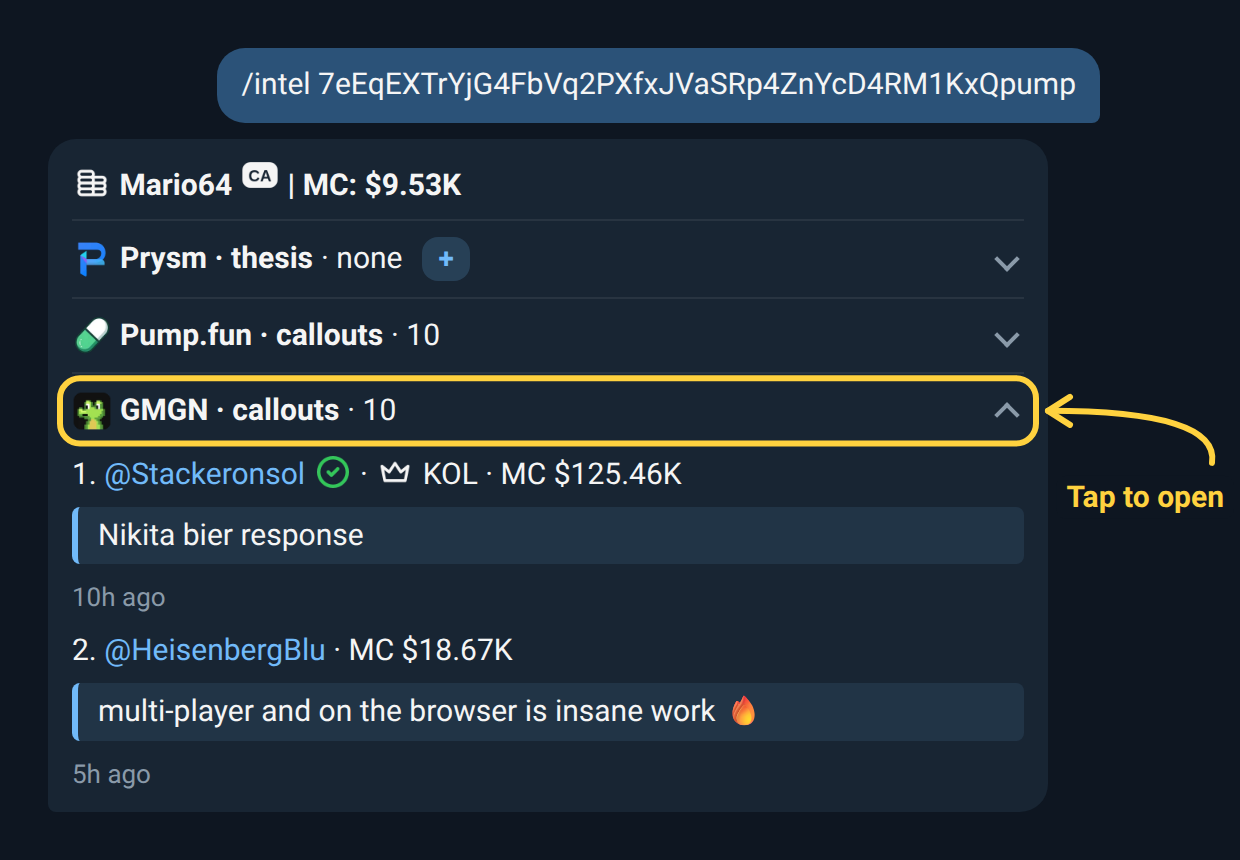
- Prysm — thesis posts made with @prysm, newest first. When a token has more than 5, you see each person’s latest only.
- Fomo — thesis posts from Fomo’s top holders. Add
latestfor the newest ones instead. - Pump.fun — callouts posted on Pump.fun, newest first.
- GMGN — callouts posted on GMGN in the last 90 days, newest first, each with the market cap when it was posted. KOLs and verified X accounts are marked.
- KOL calls — the tracked call channels that posted the token, newest first, each with the market cap when it called, the move since, how long ago and a quote from the post. See KOL Call Alerts.
- Lore — two or three sentences on the story the token is built around, written from its launch post on X (or the X profile it links). It shows the source, such as the post’s author and views. Lore is written automatically and can be wrong, so check the source. Tokens with no X link get no Lore.
Tap a section to open it. To add your own take, tap the + on the Prysm
section. Prysm asks for your thesis (only you see the question), the same as
/thesis <contract>: in a group you confirm it with Add as thesis, in
your DM it’s saved as soon as you send it.
Each post shows who wrote it, the market cap when it was posted → the market cap now, their words and the date. Prysm thesis posts name the group they were posted in only when that public group has switched Show group name on. A thesis from a private group or a DM never shows where it came from.
You get 10 posts per source. Add 20 for more, or 5 for fewer. You can also reply
/intel to any message that has a contract in it: someone’s post, a link, or one
of Prysm’s own cards and alerts.
If a source has nothing on the token, its section says so. If a source is busy or down, its section says it’s unavailable, or shows its last answer marked with how old it is.
In your DM the answer fills in on screen as each source replies: you see the
sources that have answered and which ones Prysm is still asking, then the full
answer takes its place. In a group, Prysm posts a short Looking up intel…
line and turns it into the answer. /intel <username> works the same way.
Your thesis posts: /mythesis
Section titled “Your thesis posts: /mythesis”/mythesis lists your thesis posts, newest 10 first. Tap the ❌ at the end
of a thesis to delete it. Deleting removes it from /intel for everyone. Only you can delete
your own thesis posts.
Your list always opens in your DM with @prysm. In a group, /mythesis
replies with an Open my thesis posts button that takes you there, so your list
never fills the group chat.