
Scan Cards
Paste a contract address in a group, or in your DM with @prysm, and Prysm replies with a scan card: one message with what you need to know about the token. Scan cards are on from the start, in groups and in DMs.
In a group the paste stays in the chat. It counts as a call: Prysm
remembers who pasted the token first and its market cap at that moment.
A $TICKER message can be a call too (see below).
What counts as a paste
Section titled “What counts as a paste”Prysm only answers a message that is just a contract address. A message like “look at this 0x…” gets no reply.
A message with two or more addresses, one per line or separated by commas, is a list.
-
In a group (while Scan Cards is on), when every address is a token, Prysm asks you privately what to do with them:
- Combined card posts one card in the group with every token on it: its name, where it trades, price, market cap (with the all-time high), liquidity, volume and links. Up to 5 tokens fit in one message; a longer list continues in the next. Tap a token’s name for its full card.
- Add to watchlist adds them all to the group’s watchlist.
Only you can tap the buttons, and the question expires after 15 minutes. A list of up to 20 gets the question; a longer one, or one with something that isn’t a token (a wallet, say), is added to the watchlist as before.
-
In your DM, the tokens go straight to your watchlist.
The watchlist takes up to 20 at a time, within its limit. See Watchlists.
A message that is just a ticker, like $PEPE, gets the scan card
too. Prysm picks the token this group called most recently with that
ticker (in the last 7 days), then one on the watchlist, then the most
traded token with exactly that ticker. Messages from other bots are left
alone.
In a group where nobody has called that token yet, the ticker counts as your call, just like pasting its contract: the card says You’re first, and the call shows on the leaderboard, call cards and caller stats under your name. If someone here called it before, the card shows their call and yours isn’t added. In your DM a ticker is only a lookup, the same as a pasted contract there.
Add a chain shortcut after the
ticker, like $PEPE eth or $WIF sol, and only that chain is searched.
A pin (below) doesn’t apply then, because you chose the chain.
Big coins
Section titled “Big coins”The ticker of one of the 100 biggest coins by market cap, like $ETH,
$TRX or $NEAR, gets a market card instead: the price, its move over
1 hour, 24 hours, 7 days and 30 days, the 24-hour high and low, market
cap, 24-hour volume and the all-time high, with the market’s Fear &
Greed and BTC dominance underneath. Tap 🔄 to update it. It is a lookup,
never a call. A pin for that ticker still wins and brings up the pinned
token’s scan card, and $ETH base still looks the ticker up on that chain.
Pin a ticker to a token
Section titled “Pin a ticker to a token”When a ticker means the wrong token, pin the right one with
/tickerfix <ticker> <contract>, for example /tickerfix pepe 0x…. From
then on $PEPE in this chat brings up that token’s card, before anything
else. /tickerfix pepe off takes the pin back. The pins also steer /i <ticker>, /ch, /pc and /flex in that chat. /tickerfix on its own
lists this chat’s pins, 10 to a page, with a remove button on each. Pinning or
unpinning answers with just what changed. In a group only admins
can pin or remove; in your DM the pins are your own. A chat can hold up to
100 pins.
What’s on the card
Section titled “What’s on the card”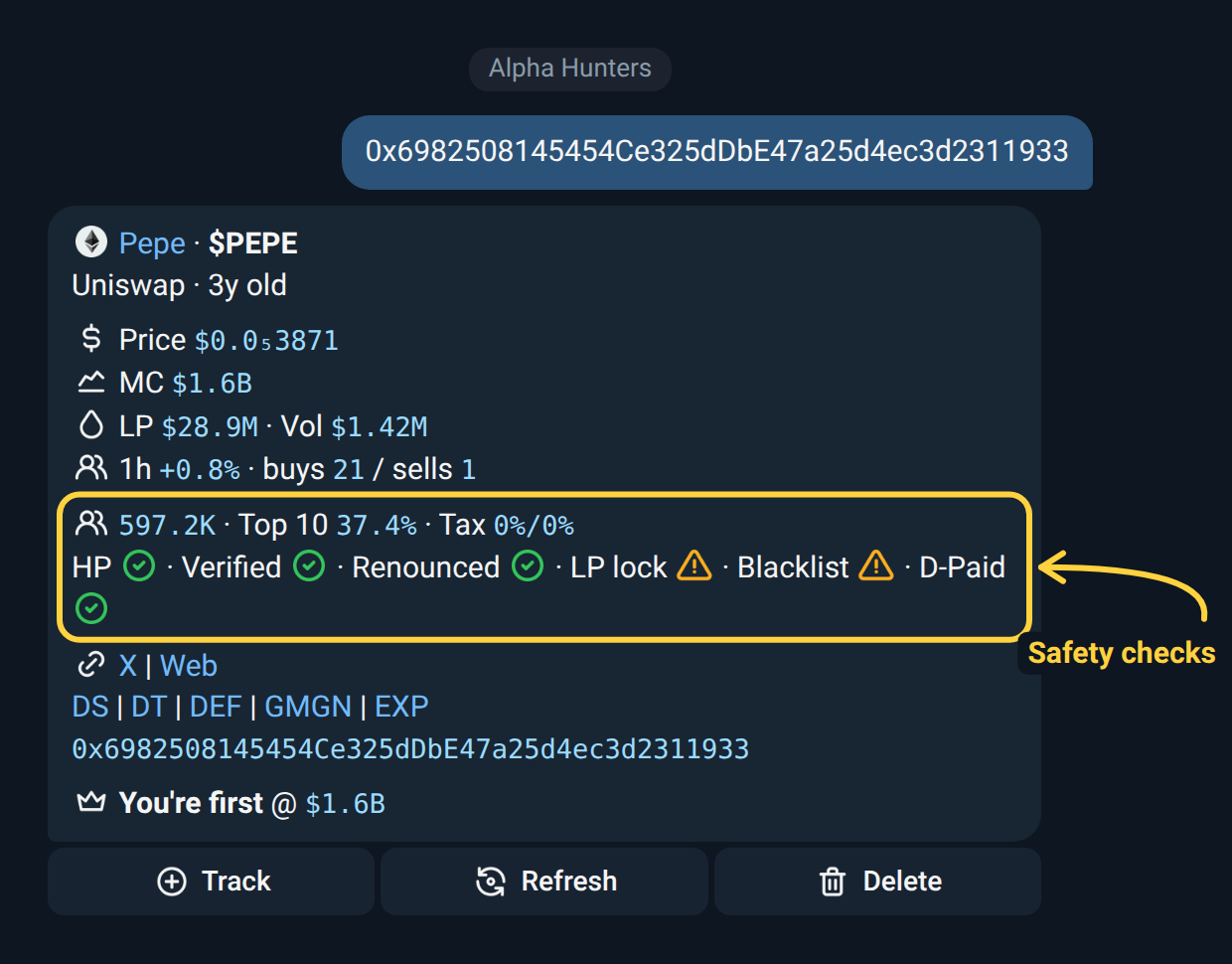
- Name and pair. The token’s name, its ticker with the pair it trades against (for example $SAFU/BNB), the launchpad it came from (still named after it moves to a DEX) or where it trades, how far along its bonding curve it is while still on one (a five-piece bar and the %, in 10% steps), and how old the pair is: in days for the first 3 months, then in months up to 5 years, then in years. A token still on a launchpad’s curve is priced from the launchpad itself, even before any DEX lists it: pump.fun, LaunchLab (StonkFun, letsbonk), Four.meme, Flap, Pons, nad.fun, Ignix, SunPump, Ascend, Stockium, Obol, StonksPad and many more across Solana, BSC, Base, Robinhood, X Layer, Monad, Arc, HyperEVM, Elysium, TRON, TON and Sui. A Stockium token that has moved on to Elysium is priced from its pool there. A gold OG badge after the name means this is the oldest live token with that ticker on its chain. When people have scanned the token in two or more groups, a 💬 with that number follows.
- Market. Price, market cap with the all-time high in brackets and how long ago it was, liquidity, 24h volume, the 1h change, and the 1h buys and sells. Prysm’s market cap counts the whole supply (the fully diluted value), the same figure on the card, the chart, callers and alerts. When part of the supply is burned, that line reads FDV and a 🔥 Burnt line shows the share burned and the market cap of what’s left. When a new token’s burned tokens are gone from its supply altogether, the market cap counts only what’s left, and the Burnt line shows how many remain (for example “Burnt 59% · 410 left of 999”).
- Safety checks, where the chain has them. Holder count, the 10 largest holders with what each one holds (liquidity pools and burned tokens are left out), buy and sell tax. Then pass or fail marks for things like: can it be sold (honeypot), is the contract verified, is ownership renounced, is the liquidity locked, can more tokens be minted. A red mark is a real risk; an amber mark is worth a look. The last mark shows whether the token’s DEX listing is paid; that one is never counted as a risk.
- Links. On Classic and Table, one row of logos: your chart sites, the token on its block explorer, its X, website, Telegram and Discord (grey when it doesn’t list one), and your trading bots. A new token without a chart profile yet gets its socials and picture from what it was launched with on its launchpad. Pick the chart sites and trading bots in Settings → Scan. The other styles show the socials and a row of chart links (DexScreener, DexTools, Defined, GMGN and the block explorer) as text.
- The contract. Tap to copy.
- First caller (groups only). Who pasted the token here first, the market cap then, how far it has moved since and how long ago. If nobody here pasted it before you, the card names you instead: yourname is first, with the market cap now, and your name opens your paste. Paste it again later and you see your own name, like everyone else.
Tapping the token’s name opens the same card in your DM with Prysm, so you can look at it or track it privately.
Forwarded messages count too: forward a call or a post (text, or a photo with a caption) and Prysm answers with a card for each contract in it, up to three, including the token behind a DexScreener chart link.
A token only minutes old that DexScreener hasn’t listed yet still gets its card: Prysm reads its price, pool and trades from where they’re first seen.
If nothing has a market for it (a wallet, an NFT collection), there’s no card and the pasted message stays. In your DM Prysm says so.
The buttons
Section titled “The buttons”| Button | What it does | Who can use it |
|---|---|---|
| Refresh | Updates the figures in place and adds a “refreshed” time. A refreshed card always names the first caller, even when that’s you. | Anyone |
| Delete | Removes the card. | In a group: only the person who pasted the contract. If the pasted message is gone from an old card, a group admin. In DM: you. |
Refresh works once every few seconds per card; tap too soon and Prysm tells you it was just refreshed.
Settings → Scan
Section titled “Settings → Scan”Everything about pastes lives in one menu. Send /settings and tap
🔍 Scan. In a group, only admins can change it. In your DM, the
menu is yours and has the same rows except Thesis.
| Setting | What it does | Default |
|---|---|---|
| Scan Cards | Whether pastes get a card. Also /scancard off and /scancard on, which new kinds of card point to in a small line for their first week. |
On |
| Style | The card’s layout, with a Send preview button. | Classic |
| Links Style | How the links look on Classic, Table and Tree cards, with the contract on its own line under them: Compact (one line), Rings or Stars (two lines with ○ or ✦ between links), or Cells (socials on one line, charts and trading bots on the line under them). The page shows an example of each. | Compact |
| Picture | What sits on top of the card: Chart (the token’s chart, with this group’s first caller marked where they called it), Banner (the token’s banner or picture), or Off. The chart shows the token’s whole life, its time on a launchpad included, with Launch and ATH marked (see charts). When a chart can’t be drawn quickly, the banner shows instead. | Banner |
Switches flip in place: tap one and the menu redraws.
Scan Cards off
Section titled “Scan Cards off”- In a group, Prysm stays quiet when a contract is pasted. The paste still counts as a call, so the leaderboard and first-caller lines keep working. Buttons on cards already posted keep working too.
- In your DM, a pasted contract gets the add prompt instead of a card.
| Style | Looks like |
|---|---|
| Classic | Everything visible, grouped with icons; links as a row of logos. |
| Table | Price, FDV, liquidity and volume in a table; the security checks fold open under Security, with a quick verdict on the fold; links as a row of logos. |
| Tree | Stats and Security sections as tree rows, with the links as logos. |
Send preview posts a card in the current style so you can compare before settling. In a group it uses the token most recently scanned there; otherwise a sample token.
Buttons
Section titled “Buttons”Every card has its buttons at the top right:
- In a group: Refresh and the Delete icon.
- In your DM: Refresh.
There is no setting for them.
Walkthrough: switch to Table
Section titled “Walkthrough: switch to Table”-
Send
/settingsand tap 🔍 Scan. -
Tap Style. The current layout is marked.
-
Tap Table. Prysm confirms and marks it.
-
Tap Send preview to see it on a real token. Every new card uses Table from now on.