
Price Alerts
A price alert watches one token and pings you when a number crosses the line you set. There are three kinds:
| Kind | Fires when | After it fires |
|---|---|---|
| Price above / below | The token’s price reaches your target | Done. It’s used up. |
| Market cap above / below | The token’s market cap reaches your target | Done. It’s used up. |
| % change | The price moves up or down by your percentage | Keeps going, measured from the new price |
DM alerts and group alerts
Section titled “DM alerts and group alerts”Where you set an alert decides who hears about it.
- In your DM with @prysm, the alert is yours. It fires in your private chat.
- In a group, the alert belongs to the group. It fires in the group, in the forum topic where it was set. Price and market cap alerts tag the person who set them. % change alerts repeat, so they don’t tag anyone.
Group alerts are handy for shared targets: “tell the room when this hits $10M.” A few more things are different in groups:
- Anyone in the group can set one. Only the person who set it, or a group admin, can remove it.
- The group has its own alert limit, separate from yours.
- If Prysm is removed from the group, its group alerts stop.
Set an alert
Section titled “Set an alert”Pick whichever is quickest for you. In all of them, values accept shorthand:
500k, 1.5m, 2b, and plain numbers like 0.0012 or 5,000.
Type it: <contract> above <value>
Section titled “Type it: <contract> above <value>”Send a contract, a direction and a value as a normal message. No command needed:
0x6982508145454Ce325dDbE47a25d4ec3d2311933 above 15m7GCihgDB8fe6KNjn2MYtkzZcRjQy3t9GHdC8uHYmW2hr below $0.002- Direction:
above,overor>for up;below,underor<for down. - A bare number is a market cap.
above 15mmeans a $15M market cap. - A
$means price.below $0.002(or0.002$) is a price alert.
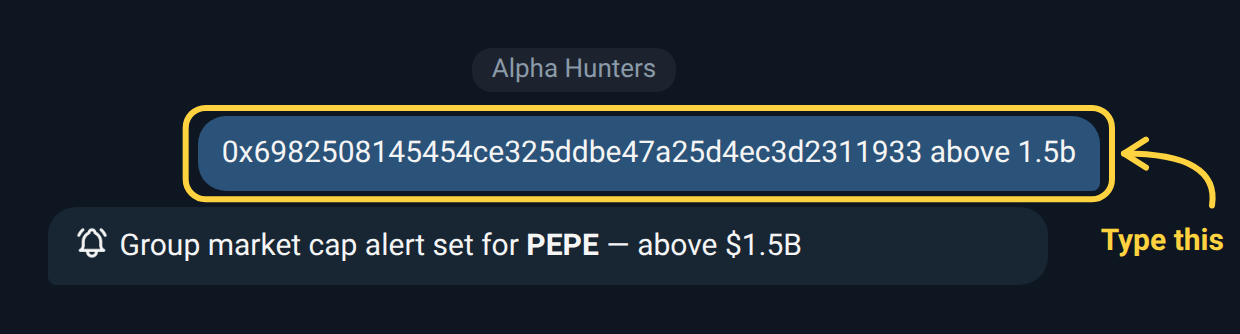
Already looking at a token card, or someone’s earlier paste? Reply to that
message with just the direction and value, like above 15m, and Prysm takes
the contract from the message you replied to.
Use /alert in one line
Section titled “Use /alert in one line”/alert <contract> <price|mcap> <above|below> <value>/alert 0x6982508145454Ce325dDbE47a25d4ec3d2311933 mcap above 25m/alert 0x6982508145454Ce325dDbE47a25d4ec3d2311933 price below 0.00001The type must be price or mcap, and the direction above or below.
Pick from buttons: /alert <contract>
Section titled “Pick from buttons: /alert <contract>”/alert <contract> shows the token with a
🔔 Set Alert button (in a group: 🔔 Alert in Group or 📩 Alert in
DM). The 🛎 on a /list row does the same for that token.
Tap it and Prysm asks one question, showing the token’s current price and market cap. Your reply box opens with a hint; type the alert the same way as above and send:
above 15m market cap above $15Mbelow $0.001 price below $0.00125% price moves 25% up or downabove 2m, 5m, 10m several at onceThis is the only way to set a % change alert: it pings you when the price moves that much either way from the price when you set it. In a group, only you see the question, and it closes after 2 minutes.
In a group, /alert on its own lists the group’s alerts with ➕ New Alert:
tap it and send any token’s contract address.
Buttons on token cards
Section titled “Buttons on token cards”- After you add a token with
/add, the card has 🔔 Set Alert in your DM, or 🔔 Alert in Group and 📩 Alert in DM in a group. - In
/list, tap the 🛎 on a token’s row. In your DM it sets a personal alert; in a group, a group alert.
📩 Alert in DM always sets a personal alert. Start a private chat with Prysm first, or it can’t message you.
Several targets at once
Section titled “Several targets at once”Every way of typing a value accepts a list of up to 10, separated by spaces or commas. Each one becomes its own alert:
0x6982508145454Ce325dDbE47a25d4ec3d2311933 above 10m, 15m, 25mA target you already have is skipped and named in the reply. If you run out of room partway through, Prysm keeps the ones that fit and tells you where it stopped.
Which tokens you can alert on
Section titled “Which tokens you can alert on”- In a group, any token. It doesn’t need to be on anyone’s watchlist.
- In your DM, typed alerts (
/alert <contract>and the<contract> above …shortcut) need the token on your watchlist first. Add it with/add, then set the alert. The 🔔 buttons on token cards set the alert directly.
What a fired alert looks like
Section titled “What a fired alert looks like”A price or market cap alert:
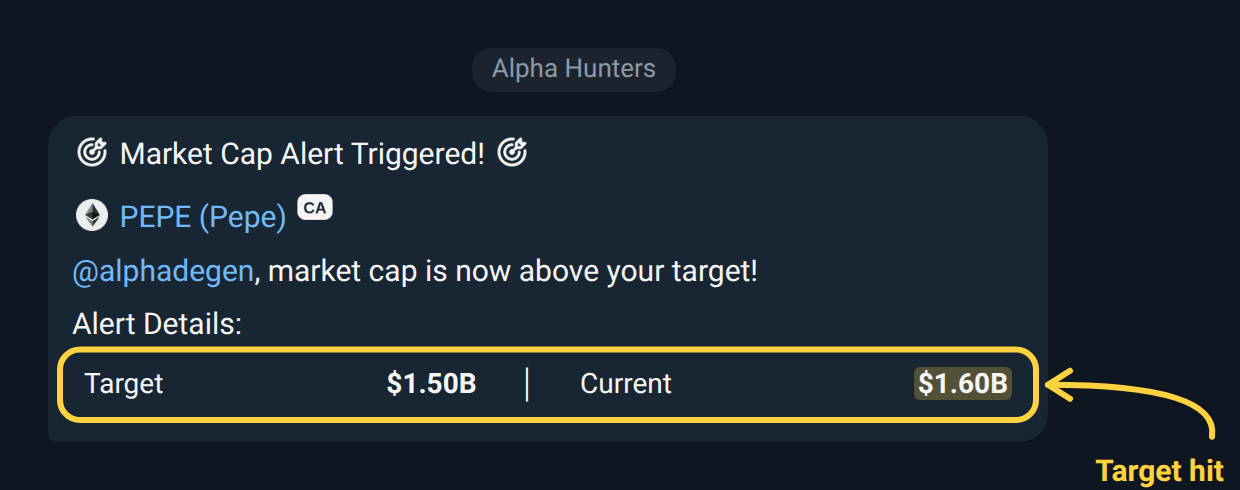
🎯 Market cap above target · @sid

🔷 PEPE (Pepe)

Current: $15.42M │ Target: $15.00M
The token name links to its chart (using your chart provider), and the button after it copies the contract. In your DM the heading has no tag: “🎯 Market cap above target”. A price alert reads “Price above target” or “Price below target”.
A % change alert is shorter. The arrow points up or down with the move:
🔷 PEPE (Pepe)

📈 MCap: $12.40M | $0.00002950 | +25.40%
After a % change alert fires, the new price becomes the starting point, so the next ping comes after another move of the same size. If a single jump is far too large to be believable (usually bad price data), the alert switches itself off instead of firing. Set it again if you still want it.
Manage your alerts
Section titled “Manage your alerts”Send /alert on its own.
- In your DM you get the Alerts Overview, grouped by token. In front of each alert, tap 📝 to change its value or the small red ❌ to cancel it. The list updates in place.
- In a group you get Group Alerts, with a small red ❌ in front of each alert. An alert can be cancelled by whoever set it or by a group admin.
Both lists have ➕ New Alert at the right of the title: send the token’s contract address and Prysm asks for the alert. In a group, Prysm’s questions are only visible to you, and your answer is removed once the alert is set.
Both lists show one chain at a time. The buttons at the top show each chain’s logo and how many alerts it has; tap one to switch to it. A chain with more than 30 alerts gets ‹ Prev and Next › buttons.
Limits
Section titled “Limits”You can have up to 2 active alerts in your
DM by default. Groups have their own alert limit; /alert in the group shows
how many are in use. Contact the bot owner to request a higher limit.
Only active alerts count. A price or market cap alert that has fired, or one you removed, frees its slot. A % change alert stays active until you remove it.