
KOL Call Alerts
Prysm keeps an eye on a list of public call channels, the Telegram channels where KOLs post the tokens they’re buying. When one of these tracked call channels posts a token your group already scanned, the group gets a short alert: who called it and the market cap at their call.
It’s a group feature, and it’s on from the start. There’s nothing to set up: paste contracts as usual and the alerts follow.
When an alert fires
Section titled “When an alert fires”A group gets an alert when a tracked call channel posts a token and the group scanned that token (someone pasted its contract) within the group’s look-back window. By default that window is 6 months.
- The alert lands in the forum topic where the token was last scanned.
- Each channel is announced once per token. A channel posting the same token again doesn’t send a second alert.
- Tokens the group never scanned never alert, so a quiet group stays quiet.
What an alert looks like
Section titled “What an alert looks like”📣 Alpha Calls called 🔵 $PEPE [CA] at MC 50K
- Line 1 names the channel. Tap the name to open its post.
- Line 2 shows the chain, the ticker (tap it to open the token on your group’s chart site), a CA button that copies the contract, and the market cap at the moment of the call.
When several channels call it
Section titled “When several channels call it”If another tracked channel calls the same token while the alert is still among the group’s latest messages, Prysm adds that channel to the same alert instead of posting a new one. Every channel is named, and the market cap becomes the average of their calls:
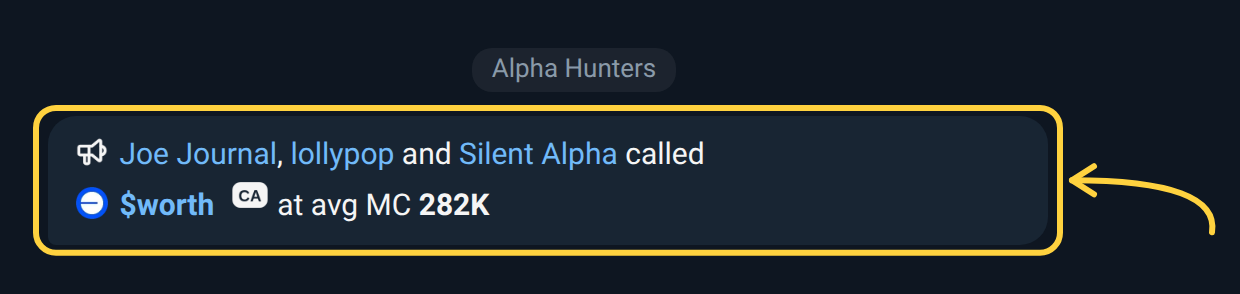
Once the chat has moved on and the alert has scrolled up, the next channel to call the token gets a new alert, so you don’t miss it.
For a group’s first few days with this feature, a new alert briefly carries a
small note saying admins can turn it off in /settings.
Settings
Section titled “Settings”Group admins open /settings → Alerts → KOL Calls. There are three
settings:
| Setting | Choices | Default |
|---|---|---|
| On / Off | Turns KOL call alerts on or off for the group | On |
| Match | CA: the same contract. Ticker: any token with the same ticker. Both: either | CA |
| Window | How far back a scan counts: 1 month, 3 months, 6 months, 1 year | 6 months |
A shorter window keeps alerts to tokens the group looked at recently. A longer one catches channels calling old picks again.
Only group admins can change these settings. Anyone in the group sees the alerts.
See every call on a token: /intel
Section titled “See every call on a token: /intel”/intel <contract> has a KOL calls section, right after GMGN. It lists the
tracked call channels that posted the token, newest first. Each one shows:
- the channel, linked to its post,
- the market cap when it called,
- how many times the token has moved since (for example 3.2x),
- how long ago it was posted,
- a quote from the post.
It works in your DM too, and covers every tracked channel, not only the ones
that alerted your group. See Thesis & Callouts
for everything else /intel shows.
Which channels call best: /kolrank
Section titled “Which channels call best: /kolrank”/kolrank ranks the tracked call channels by how their calls did. It works in
groups and in your DM. Tap 7 days or 30 days to switch the window
(7 days is the default), or type /kolrank 30d.
📣 KOL channel ranking · 🕐 7 DAYS
#   Channel        Calls  Median best  2x rate
🥇  Alpha Calls       12         3.4x      67%
🥈  Gem Hunters        8         2.1x      50%
- A call’s best multiple is the highest market cap the token reached in the 7 days after the call, divided by the market cap at the call.
- 2x rate is the share of a channel’s calls that reached 2x or more.
- Only calls posted at least 24 hours ago count, so every call has had time to move, and calls above 1000x are left out (a sign the starting market cap was wrong). A channel needs 5 or more of them in the window to be ranked.
- Channels are ordered by 2x rate, then median best multiple, then number of calls. The top 10 are shown, and each name opens the channel.